
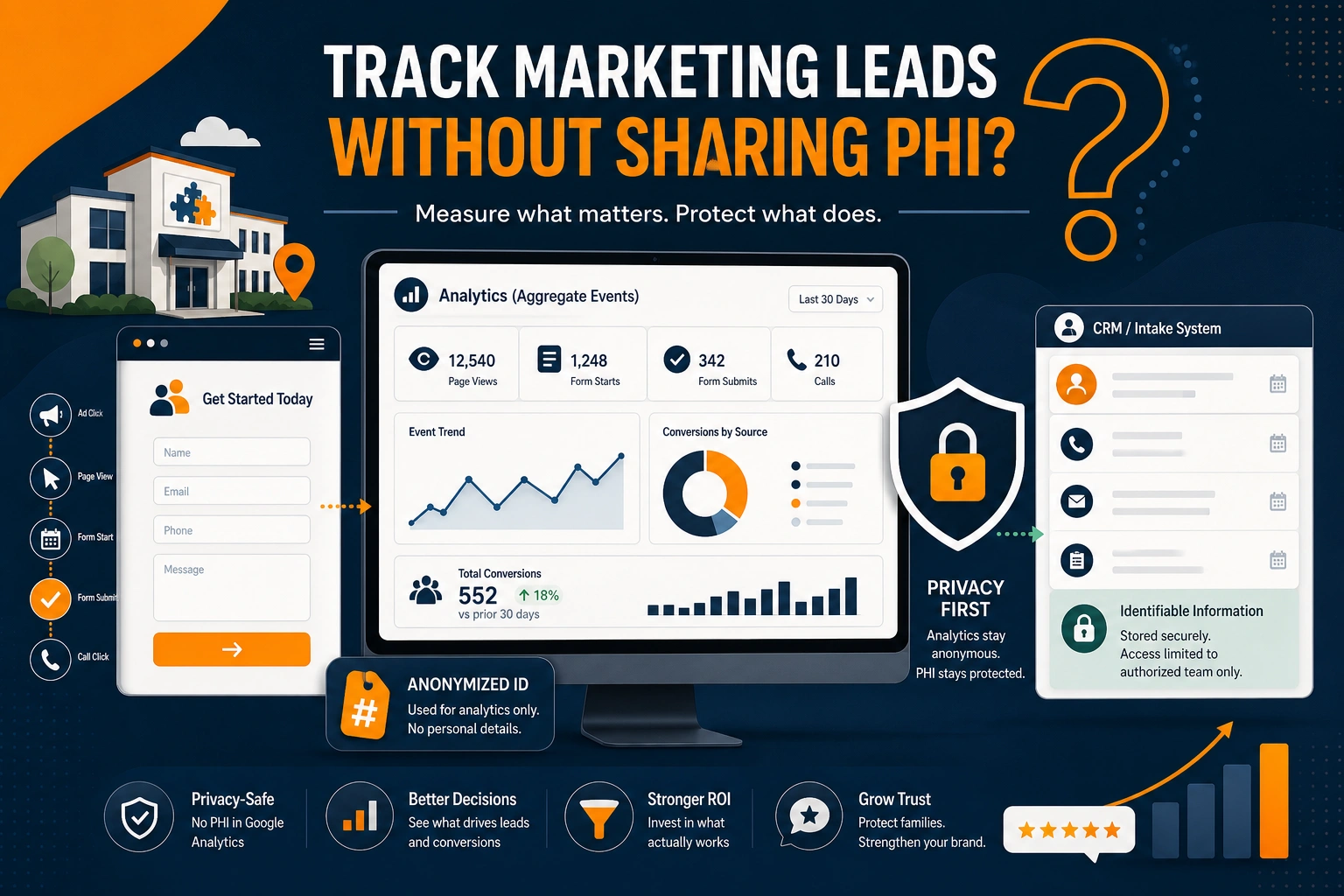
Track events, not people. That is the short answer, and it is worth stating plainly before anything else. You can measure every lead your marketing generates without ever sending a name, a diagnosis, or a phone number into Google Analytics. The trick is to record that something happened, never who it happened to.
Most ABA practices get this wrong by accident. They install analytics, connect a form, and unknowingly pass identifiable details into a tool that was never built to hold protected health information. PHI is any health detail tied to an identifiable person. Once you understand where that linkage forms, keeping it out of your analytics becomes straightforward.
What Turns a Harmless Lead Into PHI
A lead is not PHI until identity attaches to health context. The problem is that this attachment happens easily and often invisibly. A form submission event that carries the parent’s email is one example. A page URL that names a service, captured alongside an IP address, is another.
The HHS Office for Civil Rights addressed this directly in its guidance on online tracking, which treats identifiable information connected to someone’s health interest as regulated data. So an ABA intake URL that reads /autism-evaluation-signup, logged with a visitor’s identifier, is the exact situation the guidance warns about. The fix starts with seeing where that combination forms on your own site.
A No-PHI Lead Tracking Setup, Step by Step
The setup rests on one principle: separate the identity system from the measurement system. Your CRM knows who the parent is. Your analytics knows only that a conversion occurred. The two connect through an anonymous reference, never through personal detail.
Start by stripping personal data from every event parameter. When a parent submits a form, fire a generic event, something like “intake_form_submit,” and pass nothing but the fact of the submission and its marketing source. Do not attach the field values. Google’s own event documentation shows how to structure custom events, and the discipline is to keep those events empty of anything personal.
Next, let the CRM have its own identity. The parent’s name, contact details, and eventual admission live there, inside a system built for sensitive data with the right agreements in place. Connect the two worlds with an anonymized ID, so you can later see that a paid-search lead became a booked intake without ever exposing who that person was inside analytics. Clean event, anonymous link, CRM as the source of truth. That is the whole architecture.
Using Hashed or Anonymous Identifiers Safely
Hashing gets raised often as a solution, and it helps, but it is not magic. A hash converts a value like an email into a fixed string of characters that looks random. It lets you match records without storing the raw email in plain sight.
Here is the catch. Hashing alone is not always true de-identification, because a hash of the same email is always identical, which means it can still be used to single someone out.
Regulators and standards bodies treat pseudonymized data as lower risk, not zero risk, and resources like NIST’s work on de-identification spell out the limits. Use hashing to reduce exposure, but do not treat a hashed identifier as safe to pour into a tool without a BAA.
Where Consent Mode and Server-Side Tagging Fit
Two technical tools reduce your exposure further. Consent mode adjusts what gets collected based on a visitor’s choices, so a parent who declines tracking is not measured in a way that creates risk. Google explains the behavior in its consent mode documentation, and it belongs on any healthcare site.
Server-side tagging is the heavier lift with the bigger payoff. Instead of the browser sending data straight to Google, collection routes through a server you control, where identifiers can be removed before anything leaves your environment. That single change gives you a filter you simply do not have in a default setup. For how this fits the wider picture, our HIPAA-compliant marketing guide connects the pieces.
How to Prove ROI When You Cannot See the Individual
Owners worry that privacy kills measurement. It does not. You can still see how many leads each channel produced, what each lead cost, and how many turned into admissions once your CRM matches them back.
The reporting simply lives at the aggregate level. Cost per lead by source, conversion rate by campaign, and cost per admitted client all survive without a shred of PHI in your analytics. And frankly, those are the numbers that actually run a practice. You lose nothing worth keeping, and you remove a risk that could cost far more than any campaign ever earns.
Frequently Asked Questions
Can you put patient data in Google Analytics?
No. Sending PHI to Google Analytics is a HIPAA violation, because Google will not sign a business associate agreement for the product. Keep names, contact details, and health context in a CRM instead, and pass only anonymous events to analytics.
Does hashing make data HIPAA compliant?
Not on its own. Hashing lowers risk but is not guaranteed de-identification, since identical inputs produce identical hashes that can still single a person out. Treat hashed identifiers as sensitive, not safe.
How do you prove marketing ROI without PHI?
Measure at the aggregate level. Cost per lead, conversion rate by campaign, and cost per admitted client all work from anonymous events matched back to admissions inside your CRM.
Supporting deliverables
AI image generation prompt: “Flat-vector illustration of an anonymous user icon converting into a green check event on an analytics chart, a lock symbol separating the person from the data, calm teal and grey palette, clean privacy aesthetic, no readable text, 16:9.”
Image alt text: Diagram showing how to track leads without PHI using anonymised GA4 healthcare privacy events.
Meta description: Learn how to track ABA marketing leads without PHI. A GA4 healthcare privacy setup that measures conversions while keeping patient data out.